Understanding Objects in JavaScript
A beginner-friendly guide to JavaScript objects. Learn how to create objects, access properties using dot and bracket notation, and loop through keys

As we progress in our web development journey, we quickly realize that real-world data is complex. Imagine you are building a school management system. If you want to store information about a student, using individual variables gets messy fast:
let studentName = "Ritesh";
let studentAge = 22;
let studentCity = "Patna";
In our previous article, we learned about Arrays, which group data in a numbered list. But an array ["Ritesh", 22, "Patna"] does not tell us what each value represents. Is 22 his age or his city?
This is where Objects come in to save the day.
What objects are and why they are needed
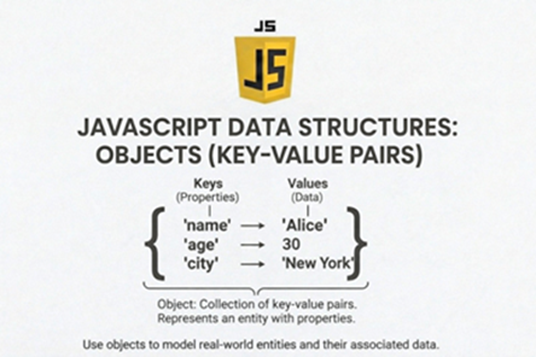
In JavaScript, objects are fundamental, non-primitive data structures used to store collections of related data and functionality. They are essentially collections of key-value pairs, where each key (or property name) is a string or a symbol, and the value can be any data type, including other objects, arrays, or functions (known as methods).Think of it like a contact card in your phone. The "Key" is the label (e.g., Phone Number), and the "Value" is the actual data (e.g., 555-1234). It is needed for:
Data Grouping
Modeling Real-World Entities
Modularity and Code Reuse
Foundation of OOP
Difference between array and object
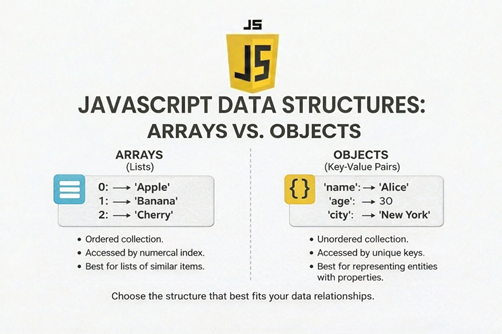
In JavaScript, arrays are specialized objects used for storing ordered lists of data with numeric indices, while objects are used for storing unordered collections of key-value pairs with named (string or symbol) keys. The core difference lies in how data is accessed, ordered, and used
Before diving into objects, let us look at a clear comparison.
Arrays use numbered indexes (0, 1, 2) to store data in a specific order.
Objects use named labels (keys) to store data, regardless of order.
Feature | JavaScript Arrays | JavaScript Objects |
Primary Use | Storing lists, sequences, and ordered collections of data. | Storing data with key-value pairs, attributes of a single entity. |
Syntax | Use square brackets []. | Use curly braces {}. |
Indexing | Use numeric indexes (0, 1, 2, ...). | Use named keys (strings or Symbols). |
Order | Elements are an ordered collection. | Properties are generally unordered. |
Accessing Data | Accessed by index (e.g., arr[0]). | Accessed by key (e.g., obj["key"] or obj.key). |
Length Property | Has a built-in, automatically updated length property. | Does not have a length property (must use Object.keys().length). |
Built-in Methods | Many specific methods for manipulation (push, pop, forEach, map, filter, etc.). | Fewer built-in manipulation methods (generic methods like Object.keys, Object.values, etc.). |
Creating objects
In JavaScript, you can create objects using several methods, with the most common being object literals, constructors, and ES6 classes. Here are the main ways to create objects:
Here are the main ways to create objects:
Object Literals (or Initializers): This is the simplest and most common method for creating a single object with a fixed set of properties.
let student = {
  name: "Ritesh Kumar",
  age: 22,
  city: "Patna"
};

console.log(student);

E:\Hitesh_Web_Dev_2026\blog_folder\05.JS-Understanding Objects in JavaScript>node assign05.js
{ name: 'Ritesh Kumar', age: 22, city: 'Patna' }
Constructor Functions: This method is useful when you need to create multiple objects with the same structure (a "blueprint"). You use the new keyword to create an instance.
function Student(firstName, lastName) {
  this.firstName = firstName;
  this.lastName = lastName;
}

const student1 = new Student("Ritesh", "Kumar");
const student2 = new Student("Singdha", "Sinha");

console.log(student1);
console.log(student2);

E:\Hitesh_Web_Dev_2026\blog_folder\05.JS-Understanding Objects in JavaScript>node assign05.js
Student { firstName: 'Ritesh', lastName: 'Kumar' }
Student { firstName: 'Singdha', lastName: 'Sinha' }
ES6 Classes: Introduced in ECMAScript 2015 (ES6), classes offer a cleaner, more structured syntax for defining object blueprints, acting as syntactical sugar over constructor functions and prototype-based inheritance.
class Student {
  constructor(firstName, lastName) {
    this.firstName = firstName;
    this.lastName = lastName;
  }

  greet() {
    return `Hello, my name is ${this.firstName}.`;
  }
}

const student = new Student("Ritesh", "Kumar");

console.log(student);
console.log(student.greet());

E:\Hitesh_Web_Dev_2026\blog_folder\05.JS-Understanding Objects in JavaScript>node assign05.js
Student { firstName: 'Ritesh', lastName: 'Kumar' }
Hello, my name is Ritesh.
Accessing properties (dot notation and bracket notation)
Once you have your object packed with data, how do you read it? JavaScript gives us two ways to access object properties.
Method 1: Dot Notation (.)
This is the most common and readable way. You simply type the object name, a dot, and the key.
let student = {
 name: "Ritesh Kumar",
 age: 22,
 city: "Patna"
};

console.log(student.name); // Output: "Ritesh Kumar"
console.log(student.city); // Output: "Patna"

E:\Hitesh_Web_Dev_2026\blog_folder\05.JS-Understanding Objects in JavaScript>node assign05.js
Ritesh Kumar
Patna
Method 2: Bracket Notation ([ ])
You use square brackets and put the key name inside as a string.
let student = {
 name: "Ritesh Kumar",
 age: 22,
 city: "Patna",
 "course name": "Web Dev Cohort 2026",
};

console.log(student["age"]); // Outputs: 22
console.log(student["course name"]);

E:\Hitesh_Web_Dev_2026\blog_folder\05.JS-Understanding Objects in JavaScript>node assign05.js
22
Web Dev Cohort 2026
When to use Bracket Notation? You must use bracket notation if your key has a space in it (e.g., "last name") or if you are using a variable to look up a key dynamically. For everyday use, stick to Dot Notation!
Updating, Adding, and Deleting Properties
Objects are mutable, meaning we can change them after they are created.
Updating a Property: If Ritesh has a birthday, we can easily update his age:
console.log(student.age); // Outputs: 22
student.age = 23;
console.log(student.age); // Outputs: 23

E:\Hitesh_Web_Dev_2026\blog_folder\05.JS-Understanding Objects in JavaScript>node assign05.js
22
23
Adding a New Property: If we want to add a new piece of information, we just assign a value to a key that does not exist yet! Ritesh now became a Developer
student.age = 23;
console.log(student);

student.job = "Developer";
console.log(student);

E:\Hitesh_Web_Dev_2026\blog_folder\05.JS-Understanding Objects in JavaScript>node assign05.js
{
  name: 'Ritesh Kumar',
  age: 23,
  city: 'Patna',
  'course name': 'Web Dev Cohort 2026'
}
{
  name: 'Ritesh Kumar',
  age: 23,
  city: 'Patna',
  'course name': 'Web Dev Cohort 2026',
  job: 'Developer'
}
Deleting a Property: If Ritesh moves and we no longer need his city, we can use the delete keyword.
student.age = 23;
console.log(student);

delete student.city;
console.log(student);

E:\Hitesh_Web_Dev_2026\blog_folder\05.JS-Understanding Objects in JavaScript>node assign05.js
{
  name: 'Ritesh Kumar',
  age: 23,
  city: 'Patna',
  'course name': 'Web Dev Cohort 2026'
}
{ name: 'Ritesh Kumar', age: 23, 'course name': 'Web Dev Cohort 2026' }
Looping through object keys (for...in)
What if you want to print out every single detail about a person, but you do not know exactly what keys exist in the object? Unlike arrays, which use a standard for loop, objects use a special loop called the for...in loop. This loop grabs every key in the object, one by one.
let student = {
 name: "Ritesh Kumar",
 age: 22,
 city: "Patna",
 "course name": "Web Dev Cohort 2026",
};

// "Let 'key' represent each label IN the 'student' object"
for (let key in student) {
  // We MUST use bracket notation here because 'key' is a variable!
  console.log(key + ": " + student[key]);
}

E:\Hitesh_Web_Dev_2026\blog_folder\05.JS-Understanding Objects in JavaScript>node assign05.js
name: Ritesh Kumar
age: 22
city: Patna
course name: Web Dev Cohort 2026
Assignment Idea
- Create an object representing a student
// 1. Create an object representing a student with name, age, and course
let student = {
  name: "Neha Kalyan",
  age: 20,
  course: "Frontend Web Development"
};

// Print the initial object
console.log("Initial Student Record:", student);

E:\Hitesh_Web_Dev_2026\blog_folder\05.JS-Understanding Objects in JavaScript>node 05-assign.js
Initial Student Record: { name: 'Neha Kalyan', age: 20, course: 'Frontend Web Development' }
- Add properties like name, age, course
// 2. Update one property (Neha had a birthday)
student.age = 21;
// Print the updated object
console.log("Updated Student Record (after birthday):", student);

E:\Hitesh_Web_Dev_2026\blog_folder\05.JS-Understanding Objects in JavaScript>node 05-assign.js
Initial Student Record: { name: 'Neha Kalyan', age: 20, course: 'Frontend Web Development' }
Updated Student Record (after birthday): { name: 'Neha Kalyan', age: 21, course: 'Frontend Web Development' }
- Update one property
// 3. Add a new property (She just got a grade!)
student.grade = "A+";
// Print the updated object with the new property
console.log("Updated Student Record (after adding grade):", student);

E:\Hitesh_Web_Dev_2026\blog_folder\05.JS-Understanding Objects in JavaScript>node 05-assign.js
Updated Student Record (after adding grade): {
  name: 'Neha Kalyan',
  age: 21,
  course: 'Frontend Web Development',
  grade: 'A+'
}
- Print all keys and values using a loop
console.log("\n--- Student Details ---");

// 4. Print all keys and values using a for...in loop
for (let key in student) {
  // Using template literals for cleaner formatting
  console.log(`\({key}: \){student[key]}`);
}

E:\Hitesh_Web_Dev_2026\blog_folder\05.JS-Understanding Objects in JavaScript>node 05-assign.js

--- Student Details ---
name: Neha Kalyan
age: 21
course: Frontend Web Development
grade: A+
Conclusion
Objects are the heart of JavaScript. By allowing us to label our data with key-value pairs, objects make our code infinitely more readable and organized. Whether you are fetching user data from a database or building a simple game character, objects are the tool you will reach for first.
Understanding objects is essential because:
Most real-world data (users, products, settings) is structured as objects.
APIs return data in object format.
Modern frameworks heavily use objects.


