Array Methods You Must Know
JavaScript Array Methods You Must Know: Map, Filter, Reduce, and More
In our web development journey, we have learned that arrays are fantastic for storing lists of data. But simply storing data is not enough but we need to manipulate it, update it, and extract specific pieces of information from it.
While we could do all this using traditional for loops, JavaScript provides built-in "tools" called Array Methods. These methods make our code cleaner, easier to read, and much faster to write.
Modern JavaScript provides powerful built-in Array methods that make code:
Cleaner
Shorter
More readable
More expressive
Let us explore the essential array methods every developer must know, starting from basic additions to powerful data transformations.
Modifying the End: push() and pop()
These two methods deal exclusively with the end of an array. They directly change (mutate) the original array.
push(): Adds one or more elements to the end of the array.
pop(): Removes the last element from the array.
let fruits = ["Apple", "Banana"];
console.log("Before:", fruits); // ["Apple", "Banana"]
// Add to the end
fruits.push("Cherry");
console.log("After push:", fruits); // ["Apple", "Banana", "Cherry"]
// Remove from the end
fruits.pop();
console.log("After pop:", fruits); // ["Apple", "Banana"]
E:\Hitesh_Web_Dev_2026\blog_folder\08.JS-Array Methods You Must Know>node 08-assign.js
Before: [ 'Apple', 'Banana' ]
After push: [ 'Apple', 'Banana', 'Cherry' ]
After pop: [ 'Apple', 'Banana' ]
Modifying the Beginning: unshift() and shift()
These two methods are the exact opposites of push and pop. They deal with the beginning (index 0) of the array.
unshift(): Adds one or more elements to the front.
shift(): Removes the first element.
let queue = ["Dilip", "Nisha"];
console.log("Before:", queue); // ["Dilip", "Nisha"]

// Add to the front
queue.unshift("Ravi");
console.log("After unshift:", queue); // ["Ravi", "Dilip", "Nisha"]
// Remove from the front
queue.shift();
console.log("After shift:", queue); // ["Dilip", "Nisha"]

E:\Hitesh_Web_Dev_2026\blog_folder\08.JS-Array Methods You Must Know>node 08-assign.js
Before: [ 'Dilip', 'Nisha' ]
After unshift: [ 'Ravi', 'Dilip', 'Nisha' ]
After shift: [ 'Dilip', 'Nisha' ]
Transforming Data: map()
This is arguably the most used array method in modern JavaScript.
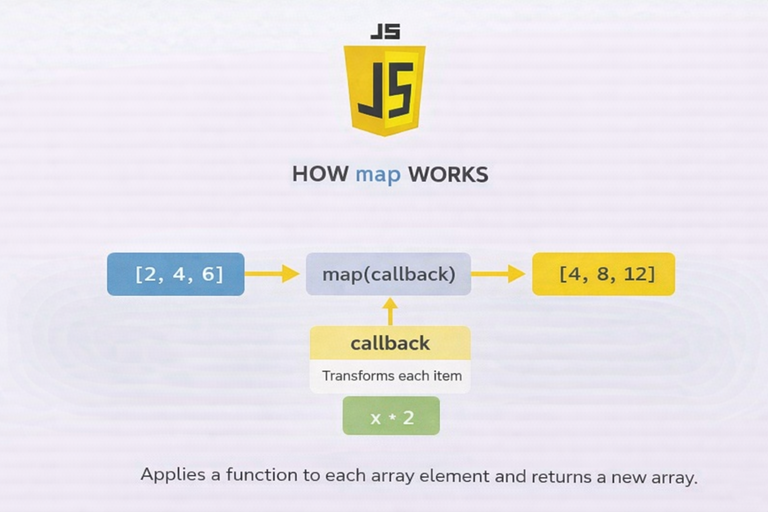
map() loops through an array, transforms every element based on a function you provide, and returns a brand-new array. It does not change the original array.
The Old Way (Traditional for loop)
let numbers = [1, 2, 3];
let doubled = [];
for (let i = 0; i < numbers. Length; i++) {
doubled. Push(numbers[i] * 2);
}
The Modern Way (map())
let numbers = [1, 2, 3];
// map automatically creates the new array for us!
let doubled = numbers.map((num) => num * 2);
console.log("Original:", numbers); // [1, 2, 3]
console.log("Mapped:", doubled); // [2, 4, 6]
E:\Hitesh_Web_Dev_2026\blog_folder\08.JS-Array Methods You Must Know>node 08-assign.js
Original: [ 1, 2, 3 ]
Mapped: [ 2, 4, 6 ]
Selecting Data: filter()
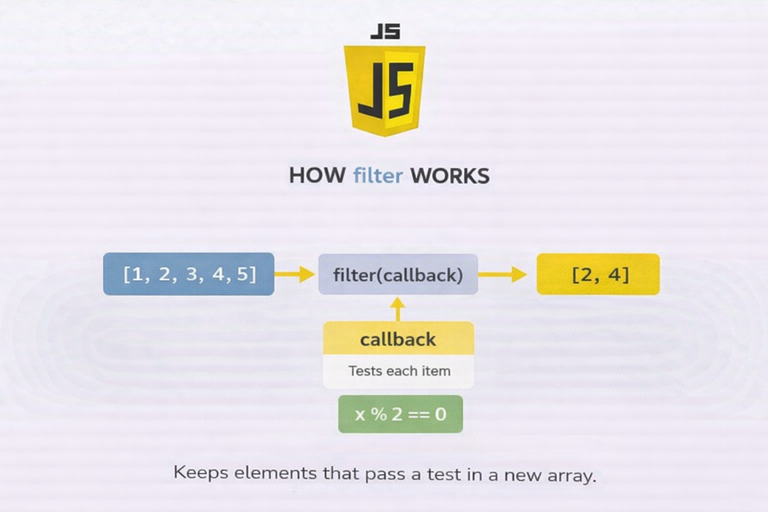
Like map(), filter() creates a new array. However, instead of transforming data, it checks each element against a condition.
If the condition is true, the item is kept.
If the condition is false, the item is skipped.
let ages = [12, 18, 25, 10, 30];
// We only want ages that are 18 or older
let adults = ages.filter((age) => age >= 18);
console.log("Filtered Adults:", adults); // [18, 25, 30]
E:\Hitesh_Web_Dev_2026\blog_folder\08.JS-Array Methods You Must Know>node 08-assign.js Filtered Adults: [ 18, 25, 30 ]
Accumulating Data: reduce()
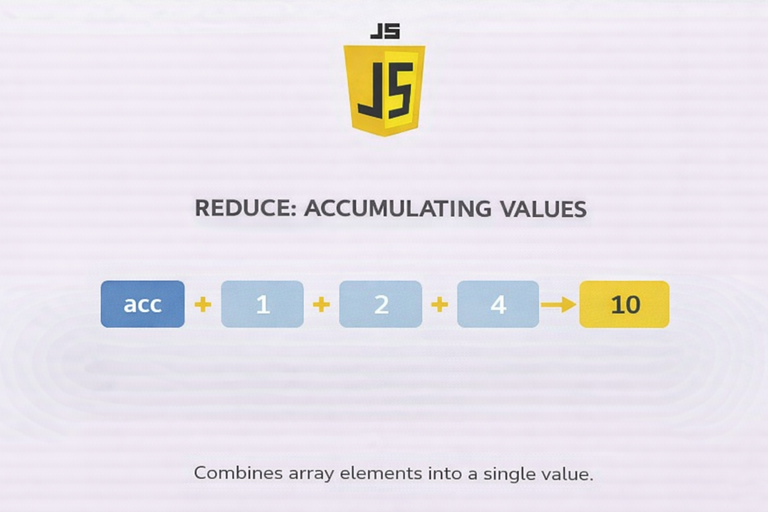
The reduce() method is the most intimidating for beginners, but it has a simple concept: it takes an array of many values and "reduces" it down to a single value (like a total sum).
Think of it like a snowball rolling down a hill. It starts small (the accumulator), and as it rolls over each element (the currentValue), it gathers them up into one giant snowball.
let cartPrices = [10, 20, 30];
// The 'total' remembers the sum as the loop runs.
// The '0' at the end is our starting value.
let sum = cartPrices.reduce((total, currentPrice) => {
return total + currentPrice;
}, 0);
console.log("Total sum:", sum); // 60
E:\Hitesh_Web_Dev_2026\blog_folder\08.JS-Array Methods You Must Know>node 08-assign.js Total sum: 60
Looping Cleanly: forEach()
The forEach() method executes a provided function once for every array element. It is a much cleaner alternative to a standard for loop when you just want to "do something" with each item.
let names = ["Alia", "Ranbir", "Surya"];

// It reads like plain English: "For each name, print the name."
names.forEach((name) => {
  console.log("Hello " + name);
});

E:\Hitesh_Web_Dev_2026\blog_folder\08.JS-Array Methods You Must Know>node 08-assign.js
Hello Alia
Hello Ranbir
Hello Surya
Assignment Idea
- Create an array of numbers
// 1. Create an array of numbers
const myNumbers = [5, 12, 8, 130, 44];
console.log("Original Array:", myNumbers);

E:\Hitesh_Web_Dev_2026\blog_folder\08.JS-Array Methods You Must Know>node 08-assign.js
Original Array: [ 5, 12, 8, 130, 44 ]
- Use map() to double each number
// 2. Use map() to double each number
// The arrow function makes this a clean one-liner!
const doubledNumbers = myNumbers.map(num => num * 2);
console.log("Doubled Array:", doubledNumbers); // Output: [10, 24, 16, 260, 88]

E:\Hitesh_Web_Dev_2026\blog_folder\08.JS-Array Methods You Must Know>node 08-assign.js
Original Array: [ 5, 12, 8, 130, 44 ]
Doubled Array: [ 10, 24, 16, 260, 88 ]
- Use filter() to get numbers greater than 10
// 3. Use filter() to get numbers greater than 10
// It checks each number. If it is > 10, it goes into the new array.
const largeNumbers = myNumbers.filter(num => num > 10);
console.log("Numbers > 10:", largeNumbers);  // Output: [12, 130, 44]

E:\Hitesh_Web_Dev_2026\blog_folder\08.JS-Array Methods You Must Know>node 08-assign.js
Original Array: [ 5, 12, 8, 130, 44 ]
Numbers > 10: [ 12, 130, 44 ]
- Use reduce() to calculate total sum
// 4. Use reduce() to calculate the total sum of the original array
// 'acc' is the accumulator (running total), 'curr' is the current number
const totalSum = myNumbers.reduce((acc, curr) => acc + curr, 0);
console.log("Total Sum of Array:", totalSum); // Output: 199

E:\Hitesh_Web_Dev_2026\blog_folder\08.JS-Array Methods You Must Know>node 08-assign.js
Original Array: [ 5, 12, 8, 130, 44 ]
Total Sum of Array: 199
Conclusion
Array methods take your JavaScript code from "beginner" to "professional".
Need to add/remove stuff? Use push, pop, shift, unshift.
Need to loop? Use forEach.
Need to change data? Use map.
Need to find specific data? Use filter.
Need a grand total? Use reduce.
Mastering these tools will make solving complex logic problems feel like a breeze. Open your code editor and try writing a few of your own today!


